Free Jeopardy PowerPoint template
Updated
This is a blank 6 × 5 Jeopardy template for PowerPoint, free to download with no account: a board slide where every square is already linked to its clue, an answer slide behind each clue, links back to the board, and a Final Jeopardy round. Type your clues over the placeholders and it is ready to play. It also opens in Google Slides and Keynote. Below is what is in the file, how to fill it in, how to run it, and the things no slide deck can do.
Download it
Blank 6 × 5 Jeopardy template for PowerPoint, with Final Jeopardy. Free, no account, no sign-up.
Download the template (.pptx)Every board in the library downloads the same way from its own page, already filled in, if you would rather start from written clues. A few of them are listed at the foot of this page.
What is in the file
- A board slide: six category headers and thirty squares from $200 to $1,000, each linked to its own clue slide, plus a Final Jeopardy button.
- Thirty clue slides, each with a Show answer button and a Back to board button.
- Thirty answer slides, each with a Back to board button.
- Final Jeopardy, reached from the button on the board.
- A link on the first and last slides to play the same board online with phone buzzers, for anyone the file gets passed to.
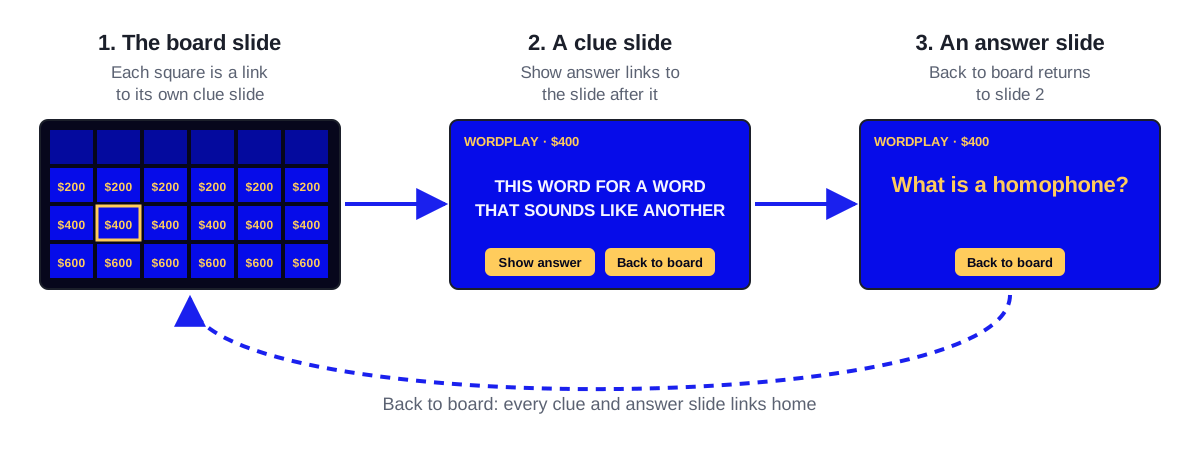
Slides move only by their links. A click on the background does nothing, rather than advancing to whichever slide happens to come next, which is what makes a hand-built deck go wrong mid-game. The arrow keys still work, for the moment you need to get somewhere the links do not go.
How to fill it in
- Type the six category names into the headers on the board slide.
- Work through the clue slides in order. Each placeholder names its square — "Type the $200 clue for category 1 here" — so you always know which clue you are on.
- Write each answer on its answer slide at the same time as the clue, not afterwards. An answer the host has to reconstruct live is the most common failure of a homemade board.
- Write the Final Jeopardy category, clue and answer last, and make it harder than anything on the board.
- Edit text, but do not delete, duplicate or reorder slides. Each link points at one particular slide, and removing one breaks the square that pointed at it without any warning.
When you are done, run the show and click every square and every Back to board button once. It takes five minutes and it is the only way to be sure nothing moved while you were typing.
How to play it
- Start the slide show and go to the board.
- A player picks a category and a value; click that square.
- Read the clue, take an answer, then click Show answer so the room sees it written.
- Click Back to board, and note the points on a whiteboard or a sheet of paper.
- When the board is done, click Final Jeopardy, collect written wagers, then reveal the clue.
Played squares do not grey out on their own, and the followed-hyperlink colour trick from the build-it-yourself guide does not apply here, because this file puts each link on the whole square rather than on its text. Two ways to handle it: during the show, switch to PowerPoint's pen (Ctrl+P, or right-click > Pointer Options > Pen) and strike through a square after it is played — the ink stays on the board slide for the rest of the show — or press Esc, delete the square's value, and resume with Shift+F5. A printed copy of the board that you cross off works too, and needs nothing from PowerPoint at all.
Opening it in Google Slides or Keynote
Google Slides opens the file directly. Upload it to Google Drive, right-click it and choose Open with > Google Slides, then File > Save as Google Slides if you want a native copy to share. The square, Show answer and Back to board links all survive the conversion, because none of them rely on animations.
Keynote opens it with File > Open. Keynote converts the file rather than editing it in place and may swap fonts it does not have, so click through one full column and Final Jeopardy before game day.
What it cannot do
- Keep score. Points live on a whiteboard or on paper.
- Grey out played squares on its own. See the two workarounds above.
- Give anyone a buzzer. The first to answer is whoever you hear first.
- Hide Daily Doubles with wagers. You can write "Daily Double" on a clue slide and take the wager out loud, but the deck will not enforce it.
- Change size. It is a 6 × 5 board; adding a column means adding thirty-odd links by hand.
Those are the limits of a slide deck rather than of this file, and in a room with no wifi they are worth accepting. Where there is wifi, Make My Jeopardy plays the same board online: players buzz in from their own phones with a five-letter code, the buzz order is settled by the server, the scoreboard keeps itself, and played squares grey out. A 6 × 5 board with Final Jeopardy is free and needs no account.
Common questions
Is the Jeopardy PowerPoint template really free?
Yes. The download needs no account and no email address, and there is nothing to unlock. The same goes for the filled-in versions of the library boards.
Can I change the point values or the number of categories?
The values are text on the board slide, so you can retype them; click each changed square once in the show afterwards to check its link came through. The number of categories and rows is fixed at 6 × 5, because every extra square needs a new clue slide, a new answer slide and the links between them.
Why doesn't the slide advance when I click?
On purpose. The template moves only by its links, so a stray click cannot jump the room to the wrong clue. Use the squares and the Show answer and Back to board buttons, or the arrow keys if you need to move manually.
Does it work on a Mac?
Yes, in PowerPoint for Mac as it is, in Keynote after it converts the file, and in Google Slides in any browser.
How do I keep score with a PowerPoint Jeopardy game?
Outside the deck. A whiteboard column per player or team is the most reliable, because everyone can see it and correct it. Editing a score slide mid-presentation is slow enough that most hosts give up on it by the second round.
Boards to play
Ready-made, with every clue written. Copy one and change what you like.
US States and Capitals Jeopardy
Fifty states, fifty capitals, one loud classroom. This free geography game runs on a projector while students answer on phone or tablet buzzers.
Solar System Jeopardy
Planets, moons, and comets for young astronomers - a solar system review board that is free to copy and plays with phones or tablets as buzzers.
World War II Jeopardy
From blitzkrieg to V-J Day, this free World War II board gives history classes a full-unit review they can play with phones as buzzers.
Periodic Table Jeopardy
Symbols, groups, and the logic of the table itself - a periodic table review chemistry teachers can copy free and run with phone buzzers in minutes.
Halloween Classroom Jeopardy
Pumpkins, bats, owls, and costumes: a gentle Halloween trivia board for elementary class parties. Copy it free and let kids buzz in on phones or tablets.
Christmas Trivia Jeopardy
Carols, holiday films, Santa lore and traditions from around the world on one festive board. Free to copy, and guests buzz in from their phones.
General Knowledge Jeopardy
Classic pub-quiz territory, six ways: maps, history, science, the arts, sports, and a grab bag. A free copy and a few phones make it a full trivia night.
New Hire Onboarding Jeopardy
A ready-made orientation game covering policies, benefits, and company know-how. Copy it free, tailor the clues to your org, and let new hires buzz in from their phones.
Make one now
A 6 × 5 board with phone buzzers, live scoring and Final Jeopardy — free, no account. Or copy a ready-made board.
Keep reading
How to make a Jeopardy game in PowerPoint
Download a free Jeopardy PowerPoint template with every link already made, or build your own: the board grid, thirty clue slides and the links back.
How to make a Jeopardy game in Google Slides
A free Jeopardy template that opens in Google Slides with every link working, or the method to build your own: the grid, the clue slides and the links back.
Jeopardy rules, scoring and wagering
Jeopardy rules for running your own game: scoring, board control, Daily Double and Final Jeopardy wagers, ties, negative scores, and which rules to drop.