How to make a Jeopardy game in PowerPoint
Updated
PowerPoint has no Jeopardy feature, so a Jeopardy deck is a grid of shapes where each square is hyperlinked to its own slide, and each of those slides is hyperlinked back. For a full 6 × 5 board that is thirty clue slides and around sixty links. It works, it runs offline, and it is entirely yours. If you want the finished deck rather than the evening, a free template with every link already made is just below. If you want to build it yourself, here is the method that holds up, followed by an honest account of where it stops.
Skip the build: the free template
A blank 6 × 5 Jeopardy template for PowerPoint, free and with no account: every square linked to its clue, an answer slide behind each one, links back to the board, and a Final Jeopardy round.
Download the template (.pptx)It is the deck the steps below build, with the linking done. The one difference is the reveal: instead of a trigger animation, each clue slide has a Show answer button that jumps to its own answer slide, and every slide advances only by its links. That is what stops a nervous click on the background from skipping to the next clue in front of the room.
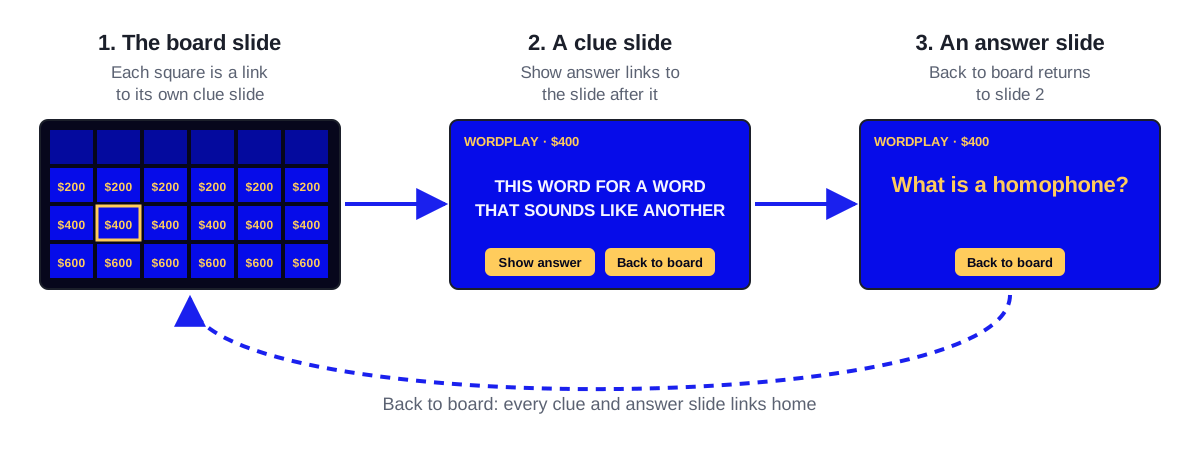
Each clue slide says something like "Type the $200 clue for category 1 here", so filling it in is a matter of typing over the placeholders in order. What the template does not change is what a slide deck can do: the score is still kept by hand, and played squares still have to be marked. Every board in the library also downloads as a filled-in deck from its own page, if you would rather start from clues that are already written.
Building the deck
Make the board slide
One slide, dark background. Insert a 6 × 6 table, or 36 rectangles if you want per-square control — the table is faster but fights you later when you want a square to change colour. Top row holds the category names; the five rows beneath hold 200 through 1000.
Duplicate one clue slide thirty times
Build a single clue slide first — clue text centred, plenty of margin, one text box for the answer parked off to the side. Get it right once, then duplicate. Building thirty slides individually is how decks end up with three different font sizes.
Put the answer behind a trigger animation
Select the answer text box, add an Appear animation, then in the Animation Pane open Timing and set Triggers to "Start effect on click of" the answer box itself. This is what lets you show the clue, wait, and reveal the answer with a click rather than by advancing to another slide. Slides advanced by arrow key will get advanced accidentally.
Add a return link to every clue slide
A small shape in a corner, hyperlinked back to the board slide. Add it to the Slide Master instead of each slide, or you will place it thirty times and it will be in a slightly different spot on four of them.
Hyperlink the board squares
Select a square's text, Insert > Link > Place in This Document, and choose that clue's slide. Repeat thirty times. Work down a column at a time rather than across a row — column order matches the slide order, so you are not scrolling the slide picker back and forth.
Mark used squares as you play
PowerPoint will not grey a square out for you. The closest it comes is the followed-hyperlink colour: when a link sits on a square's text, PowerPoint recolours that text once it has been clicked, for the rest of the show, so setting Followed Hyperlink to something near the square's fill (Design > Variants > Colors > Customize Colors) makes played values fade. Otherwise, press Esc, delete the square's value, and resume with Shift+F5, or keep a paper printout of the board and cross squares off.
Test every link before game day
Run the show and click all thirty squares and all thirty return links. In a deck this size at least one link will point at the wrong slide, and finding that during the game is worse than the five minutes it takes to check.
The parts PowerPoint will not do
None of this is a criticism of the method — it is just what a slide deck is. Worth knowing before you commit an evening to it:
- No buzzers. There is no way for the room to signal who was first, so you are adjudicating by ear, which the loudest person wins.
- No scoring. Scores live on a whiteboard or in someone's head, and someone will lose track around the 800 row.
- Used squares are manual. Every deck solves this differently and every solution involves the host clicking something mid-game.
- Editing is expensive. Reordering categories re-points links; deleting a clue slide breaks the square that pointed at it, silently.
- Sharing means sending a file. Everyone who wants to run your game needs a copy, and there is no way to know which copy is current.
When PowerPoint is the right answer anyway
If the room has no reliable wifi, a local deck is the only thing that will definitely work, and that outweighs every point above. The same goes for a locked-down machine that will not let you open an unapproved site, and for a game you need to hand to a colleague as a file they can keep.
The faster route, if you do have wifi
The hyperlinking exists only because PowerPoint does not know what a Jeopardy board is. A tool that does removes the whole step: you type clues into a grid, and the board, the used-square tracking and the scoreboard come for free.
That is what Make My Jeopardy does. Type your thirty clues, open the presenter view on the TV, and players join with a five-letter code from their own phones — no app, no account, and the buzz order is settled by the server rather than by volume. A 6 × 5 board with buzzers, live scores and Final Jeopardy is free, and you can copy a ready-made board from the library if you would rather start from something written.
If you already have your clues in a spreadsheet — which is how most people draft them — you can import the sheet straight into a board rather than retyping it.
Common questions
Is there a free Jeopardy PowerPoint template?
Yes. The one on this page is a blank 6 × 5 board with every link made, free to download with no account, and every board in the library downloads as a filled-in version. Any template saves you the hyperlinking but inherits the limits of a slide deck: no buzzers, no scoring, and deleting or reordering slides still breaks the links that point at them. Click through a column before game day whichever template you use.
How do you keep score in a PowerPoint Jeopardy game?
Outside the deck. A whiteboard column per team is the most reliable, because everyone can see it and correct it. Score slides inside the deck exist but require editing text mid-presentation, which is slow enough that hosts abandon it by the second round.
Can you add buzzers to a PowerPoint Jeopardy game?
Not within PowerPoint. People pair the deck with a separate buzzer — physical buzzer sets, or a web page everyone opens on their phones. At that point you are running two things at once, which is usually the moment it is worth moving the whole game to something that has buzzers built in.
Does the same method work in Keynote?
Yes, with different menu names. Keynote's hyperlinks are under Format > More Options > Add Link, and the reveal is done with a Build In set to Start On Click. The link count and the limitations are identical.
Boards to play
Ready-made, with every clue written. Copy one and change what you like.
US States and Capitals Jeopardy
Fifty states, fifty capitals, one loud classroom. This free geography game runs on a projector while students answer on phone or tablet buzzers.
Solar System Jeopardy
Planets, moons, and comets for young astronomers - a solar system review board that is free to copy and plays with phones or tablets as buzzers.
World Geography Jeopardy
A whirlwind tour from the Andes to the Yangtze: world geography review that costs nothing to copy and turns every student's phone into a buzzer.
Human Body Jeopardy
Bones to brains, one body-systems review game for elementary science. Teachers copy it free; every phone in class becomes a buzzer.
Make one now
A 6 × 5 board with phone buzzers, live scoring and Final Jeopardy — free, no account. Or copy a ready-made board.
Keep reading
Free Jeopardy PowerPoint template
A free, blank Jeopardy template for PowerPoint: a linked 6 × 5 board, clue and answer slides and Final Jeopardy. What is in it, how to fill it in and play it.
How to make a Jeopardy game in Google Slides
A free Jeopardy template that opens in Google Slides with every link working, or the method to build your own: the grid, the clue slides and the links back.
How to make a Jeopardy game
How to build a custom Jeopardy game: how many clues you need, writing clues that play, the scoring rules, and how to run it on the day.