How to make a Jeopardy game in Google Slides
Updated
Google Slides can do everything PowerPoint can here except one thing, and that one thing changes the build. Slides has no trigger animations, so you cannot click a box to reveal an answer on the same slide. The standard workaround is a second slide per clue, which turns a thirty-clue board into sixty slides. If you would rather not build it at all, a free template that opens in Slides with every link already made is just below. After it: the method, and the two ways to avoid the doubling.
Skip the build: open the template in Slides
A blank 6 × 5 Jeopardy template, free and with no account. It is a PowerPoint file, and Google Slides opens it with every link intact.
Download the template (.pptx)- Upload the file to Google Drive: New > File upload.
- Right-click it in Drive and choose Open with > Google Slides.
- Choose File > Save as Google Slides, so the copy you edit and share is a native Slides file rather than the uploaded .pptx.
- Type over the placeholders — each clue slide reads "Type the $200 clue for category 1 here" and so on — then present and click through one column to check the links landed.
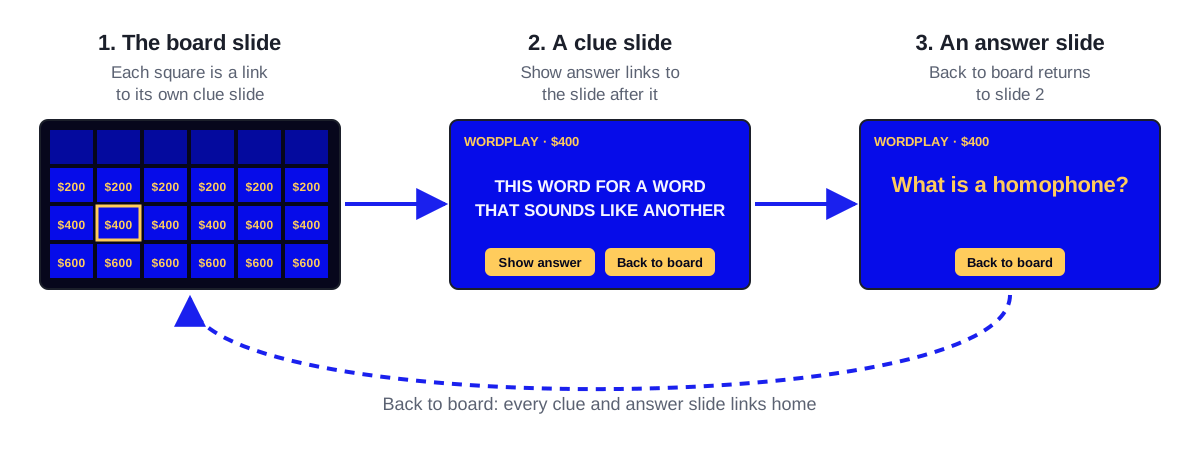
The template already uses the structure this guide arrives at: a separate answer slide behind each clue, reached by a Show answer button, and a Back to board button on every answer. Nothing in it depends on trigger animations, which is why it survives the trip from PowerPoint to Slides.
Building the deck
Set the theme dark before you build anything
Slide > Change theme, or set the background to a deep blue on the master. Doing this first means every duplicated slide inherits it. Doing it after you have sixty slides means changing sixty slides.
Build the board grid
Insert > Table, 6 columns by 6 rows on one slide. Categories along the top, 200 through 1000 down each column. Centre everything vertically — Slides defaults to top-aligned table text, which looks wrong on a board where the numbers are the whole design.
Make one clue slide and one answer slide
The clue slide holds the clue and nothing else. The answer slide holds the same clue in smaller text at the top and the answer beneath it, so the room can still see what was asked. Get both right once, then duplicate the pair thirty times.
Link each square to its clue slide
Select the text in a square, press Ctrl+K (Cmd+K on a Mac), then click "Slides in this presentation" and pick the slide. Slides lists them by number and thumbnail, so name your slides in the filmstrip first if you want this to be quick.
Link every answer slide back to the board
Put a small shape bottom-right on the answer slide layout, linked to slide 1. Editing the layout rather than the slides means one edit instead of thirty, and it lands in exactly the same place every time.
Present in a tab, not in a window you will alt-tab out of
Slides' present mode swallows the arrow keys, which is what you want — the board is navigated by clicking links, and an accidental arrow press jumps you to slide 2 with no way back that the room will not notice.
Avoiding sixty slides
Two workarounds are common, and both trade something.
- Cover the answer with a shape the same colour as the background, and delete it live during the game. Keeps you at thirty slides, but you are presenting from edit view, so the room sees your filmstrip.
- Skip the answer slide and just say the answer out loud. Perfectly fine for a fast-moving party game, worse for a classroom, where seeing the answer written is most of the learning.
What Slides gives you that PowerPoint does not
One link to share, and colleagues can copy your board with File > Make a copy rather than emailing a deck around. For a department that reuses the same review game across sections, that alone is worth the extra slides.
It also autosaves, which matters more than it sounds when the build is an hour of fiddly hyperlinking.
What it still cannot do
The same three things no slide deck can: there are no buzzers, so first-to-answer is decided by whoever is loudest; there is no scoring, so someone is keeping it on a whiteboard; and used squares are marked by hand, mid-game, in edit view.
If those are the parts you were dreading, they are the parts a purpose-built board maker removes. Make My Jeopardy gives every player a buzzer on their own phone through a five-letter code, decides the buzz order server-side, keeps the scores, and greys out a square when it has been played. A full 6 × 5 board with Final Jeopardy costs nothing and needs no account, and if your clues are already in a Google Sheet you can import the sheet rather than retyping it.
Common questions
Can students play a Google Slides Jeopardy game on their own devices?
They can open the deck, but they should not — anyone with the link can click ahead to the answers. Keep the deck on the presenter's screen and give students something else to answer with, whether that is hands, mini whiteboards or a buzzer they open on their phones.
How do you make a square disappear after it has been used in Google Slides?
You change its fill to the background colour, which requires edit view. There is no way to do it from present mode, which is why most hosts keep a printed board and cross squares off instead.
Is there a Google Slides Jeopardy template?
Yes. The free template on this page is a PowerPoint file that Google Slides opens directly: upload it to Drive, open it with Google Slides, and the square, answer and return links all still work. Whichever template you use, click through five or six squares and the return links before you commit — templates get copied and re-copied, and broken links propagate with them.
Boards to play
Ready-made, with every clue written. Copy one and change what you like.
Parts of Speech Jeopardy
Help elementary students sort nouns from verbs from adjectives with a buzzer game built for grammar review. Copying the board costs nothing.
Fractions Jeopardy
A fractions review game for 3rd and 4th graders: naming, equivalents, comparing, and simple sums. Copy it free and let the class answer on phone buzzers.
Ancient Egypt Jeopardy
Pharaohs, pyramids, and the gift of the Nile in a free classroom game. Copy the board, hand out the join code, and students buzz in on their phones.
Dinosaurs Jeopardy
Carnivores, herbivores, fossils, and famous species from T. rex to Triceratops. An elementary dinosaur review, free to copy, played on phone buzzers.
Make one now
A 6 × 5 board with phone buzzers, live scoring and Final Jeopardy — free, no account. Or copy a ready-made board.
Keep reading
Free Jeopardy PowerPoint template
A free, blank Jeopardy template for PowerPoint: a linked 6 × 5 board, clue and answer slides and Final Jeopardy. What is in it, how to fill it in and play it.
How to make a Jeopardy game in PowerPoint
Download a free Jeopardy PowerPoint template with every link already made, or build your own: the board grid, thirty clue slides and the links back.
How to run a Jeopardy review game in class
How to run a Jeopardy review game the whole class plays: team setup, timing, scoring that keeps quiet students in, and the usual failure modes.